Frequent no-shows cost the average American service business thousands in lost revenue every year. If you are juggling phone calls, spreadsheets, and endless email chains to manage your team’s bookings, you are not alone. Understanding the roots of common scheduling headaches is the first move toward a system that cuts down on missed appointments and keeps clients more engaged from the very start.
Table of Contents
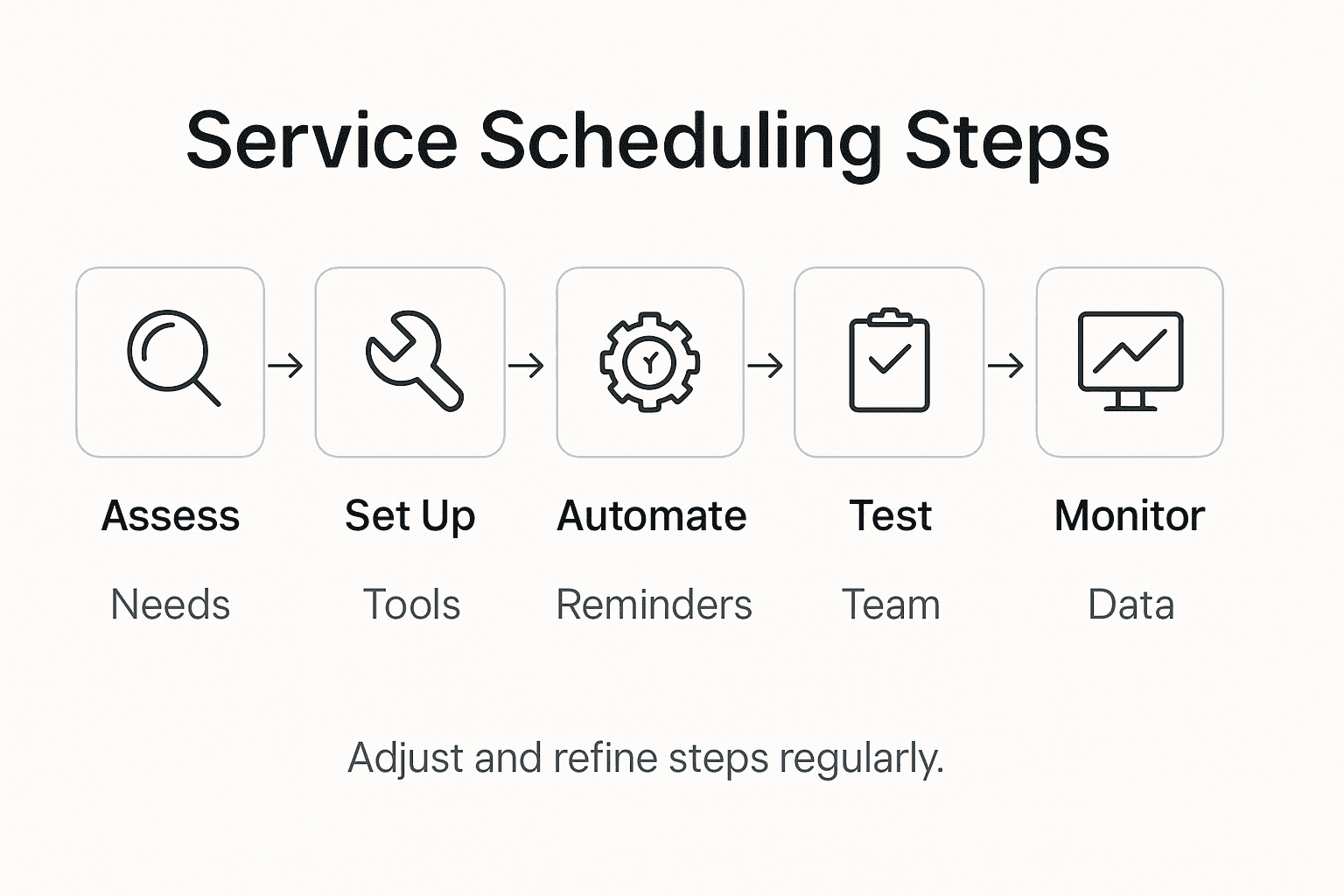
- Step 1: Assess Current Scheduling Needs
- Step 2: Set Up Booking Tools And Integrations
- Step 3: Automate Notifications And Reminders
- Step 4: Test Scheduling Flows With Your Team
- Step 5: Monitor Performance And Adjust Processes
Quick Summary
| Key Insight | Explanation |
|---|---|
| 1. Assess scheduling needs first | Evaluate current appointment processes to identify inefficiencies and improvement opportunities. |
| 2. Choose integrated booking tools | Select software that matches your needs and integrates well with existing systems for smooth operations. |
| 3. Automate client notifications | Use automated reminders to ensure timely client communication and reduce no shows effectively. |
| 4. Test scheduling workflows thoroughly | Conduct comprehensive tests with your team to ensure the new system operates without issues. |
| 5. Monitor and adjust regularly | Continuously review performance metrics to refine booking processes and enhance client satisfaction. |
Step 1: Assess current scheduling needs
Successfully managing your service business starts with a thorough understanding of your current scheduling landscape. This critical first step involves analyzing your existing appointment and booking processes to identify gaps, inefficiencies, and opportunities for improvement.
Begin by conducting a comprehensive review of your current scheduling methods. Service industry scheduling models require a strategic approach to resource allocation and demand management, which means examining every aspect of how appointments and client interactions are currently managed. Map out your existing workflow by documenting each step your team takes to schedule clients track appointments, and manage availability. Pay attention to manual processes like phone bookings, email exchanges, or spreadsheet tracking that consume significant administrative time.
Review your business specific scheduling challenges by gathering input from team members and analyzing recent booking data. Look for recurring issues such as frequent no shows, scheduling conflicts, or bottlenecks in your current system. Some key questions to consider include how long it takes to schedule a single appointment, how often double bookings occur, and what percentage of potential clients are lost due to complicated booking processes.
Pro tip: Collect scheduling data from the past 3-6 months to establish a baseline and identify clear patterns in your booking behaviors and client interaction trends.
Here’s a summary of common scheduling challenges and potential solutions for service businesses:
| Challenge | Description | Possible Solution |
|---|---|---|
| Frequent No-shows | Clients miss scheduled time | Automated reminders and confirmations |
| Scheduling Conflicts | Double bookings or overlaps | Smart calendar synchronization |
| Lost Potential Clients | Complicated booking procedures | Streamlined online booking options |
| Manual Admin Work | Phone/email/sheet tracking | Centralized booking software |
Step 2: Set up booking tools and integrations
Now that you’ve assessed your current scheduling needs, it’s time to select and implement the right booking tools that will transform your service business operations. This step involves choosing software that not only meets your specific requirements but also integrates seamlessly with your existing workflows.
Advanced booking software enables businesses to build customized workflows that extend scheduling capabilities across multiple systems, allowing you to create more efficient and automated appointment management processes. Start by evaluating booking platforms that offer comprehensive features like calendar synchronization, client communication tools, and integration with your preferred communication channels. Look for solutions that support multiple booking methods such as online scheduling, phone bookings, and email coordination.
During the setup process, focus on configuring your booking tool to match your specific service offerings. This includes adding detailed service descriptions, setting precise duration times, establishing pricing structures, and defining staff availability. Pay special attention to integration capabilities that allow your booking system to connect with existing tools like customer relationship management software, payment processors, and communication platforms. Configure automated notifications to reduce no shows and improve client communication by sending timely reminders and confirmation messages.
Pro tip: Test your booking integration thoroughly by scheduling several mock appointments and walking through the entire client booking experience to identify and resolve any potential friction points.
Step 3: Automate notifications and reminders
Streamlining communication with clients through automated notifications is a game changer for service businesses looking to reduce no shows and improve overall scheduling efficiency. This crucial step transforms how you interact with clients by ensuring timely and consistent communication throughout the booking process.
Automated reminder systems leverage technology to send precise notifications via multiple communication channels, helping businesses maintain punctual scheduling and reduce human error. Configure your booking tool to send automatic reminders through email, SMS, and app notifications at strategic intervals before the scheduled appointment. These notifications should include key details such as appointment date, time, service type, and any preparation instructions. Set up different reminder schedules for various service types some might require more advanced notice than others.
Take time to personalize your automated notifications to reflect your business brand and communication style. Create multiple reminder templates that can be customized based on service category, client type, or specific business needs. Implement a system that allows clients to confirm, reschedule, or cancel appointments directly through these notifications, which reduces administrative workload and gives clients more control over their bookings. Consider setting up escalating reminder sequences for example, an initial reminder one week before the appointment, a follow up three days prior, and a final confirmation 24 hours in advance.
Pro tip: Regularly analyze your reminder metrics to optimize timing and frequency tracking which notification methods generate the highest confirmation and attendance rates.
Step 4: Test scheduling flows with your team
Ensuring your new scheduling system works flawlessly requires comprehensive testing and collaborative validation across your entire team. This critical step helps identify potential issues and refine your booking process before going live with clients.
Effective scheduling flow testing involves strategic planning and collaborative evaluation of each workflow stage, ensuring your system meets operational requirements. Organize a structured testing session where each team member plays a specific role in simulating real world booking scenarios. Create a comprehensive test plan that covers various appointment types, potential client interactions, and edge cases such as rescheduling, cancellations, and multi staff bookings. Assign team members to test different aspects of the scheduling system including client experience, staff availability management, notification workflows, and integration capabilities.
During the testing phase, document every interaction and potential friction point systematically. Use a standardized tracking method to record issues, unexpected behaviors, and suggested improvements. Pay special attention to user experience elements like booking page navigation, mobile responsiveness, and ease of scheduling across different devices. Encourage team members to provide honest feedback and think critically about potential client challenges. Validate that automated notifications work correctly, calendar synchronization functions seamlessly, and all integrated tools communicate without disruption.
Pro tip: Create a dedicated testing spreadsheet with specific scenarios and assign each team member a unique set of test cases to ensure comprehensive and non repetitive system validation.
Step 5: Monitor performance and adjust processes
Successfully implementing a scheduling system is an ongoing journey that requires continuous evaluation and refinement. This crucial step focuses on transforming raw data into actionable insights that will help optimize your booking processes and improve overall business performance.
A master scheduling approach requires continuous monitoring and strategic adjustments based on real time performance data, enabling your business to remain responsive and efficient. Establish a comprehensive tracking system that captures key performance metrics such as booking conversion rates, no show percentages, average scheduling time, and client satisfaction scores. Utilize built in analytics tools within your scheduling platform to generate detailed reports that provide visibility into your team’s scheduling effectiveness. Set up regular review intervals weekly or monthly to analyze these metrics and identify trends or potential areas of improvement.
Develop a proactive adjustment strategy that allows you to quickly respond to insights gained from your performance monitoring. This might involve modifying booking windows, adjusting staff availability, refining automated notification strategies, or updating service descriptions based on client feedback. Create a standardized process for documenting and implementing changes, ensuring that all team members understand the rationale behind process modifications. Consider implementing a feedback loop that allows both staff and clients to contribute suggestions for improving the scheduling experience, transforming performance monitoring into a collaborative and dynamic continuous improvement effort.
Pro tip: Implement a quarterly comprehensive review where you compare current scheduling metrics against your original baseline to track meaningful improvements and identify long term optimization opportunities.
Consider these key metrics when monitoring your scheduling system’s performance:
| Metric | What It Measures | Business Impact |
|---|---|---|
| Booking Conversion | Percent of successful bookings | Reveals process efficiency |
| No-show Rate | Missed appointments | Indicates need for better reminders |
| Avg. Scheduling Time | Time to book each appointment | Exposes workflow bottlenecks |
| Client Satisfaction | Feedback on experience | Guides process and system improvements |
Optimize Your Service Scheduling with Bookafy’s Smart Solutions
Mastering the scheduling process is essential to overcome challenges such as no-shows, scheduling conflicts, and time-consuming manual tasks highlighted in the article “Master Service Business Scheduling Steps for Success.” If you want to improve client engagement, streamline your booking workflows, and reduce missed appointments, you need a powerful tool tailored for your service business needs. Bookafy addresses these pain points by offering smart routing, seamless calendar synchronization, and automated reminders that transform your scheduling into a smooth experience for both your team and clients.
Experience the benefits of an all-in-one appointment automation platform that supports skill-based routing, customizable branding, and multiple communication channels. Start reducing your administrative workload and increasing your booking conversion rates today by visiting Bookafy. Discover how you can enhance your scheduling flows by integrating advanced tools and automations outlined in the article by checking out Bookafy’s platform. Don’t wait to transform your customer experience and gain a competitive edge in your service industry with solutions designed for success.
Frequently Asked Questions
How can I assess my current scheduling needs effectively?
To assess your current scheduling needs, review your existing appointment processes and identify any inefficiencies. Document each step involved in scheduling and gather input from team members to understand common challenges.
What booking tools should I consider for my service business?
Select booking tools that offer features like calendar synchronization, client communication, and online scheduling options. Evaluate platforms to ensure they integrate well with your current systems and streamline your booking process.
How can I automate notifications and reminders for clients?
Automate reminders by configuring your booking tool to send notifications via email or SMS at specified intervals before appointments. Set up reminders that include essential details, allowing clients to confirm or reschedule directly to reduce no-shows.
What steps should I take to test my new scheduling system?
To test your new scheduling system, organize a structured session where team members simulate real-world booking scenarios. Document each interaction and potential issues to ensure the system functions properly before going live with clients.
How often should I monitor performance and adjust my scheduling processes?
Monitor your scheduling performance regularly, ideally on a weekly or monthly basis. Establish key metrics to track, such as no-show rates and booking conversion rates, and be proactive in making adjustments based on these insights to improve efficiency.